Make the work visible.
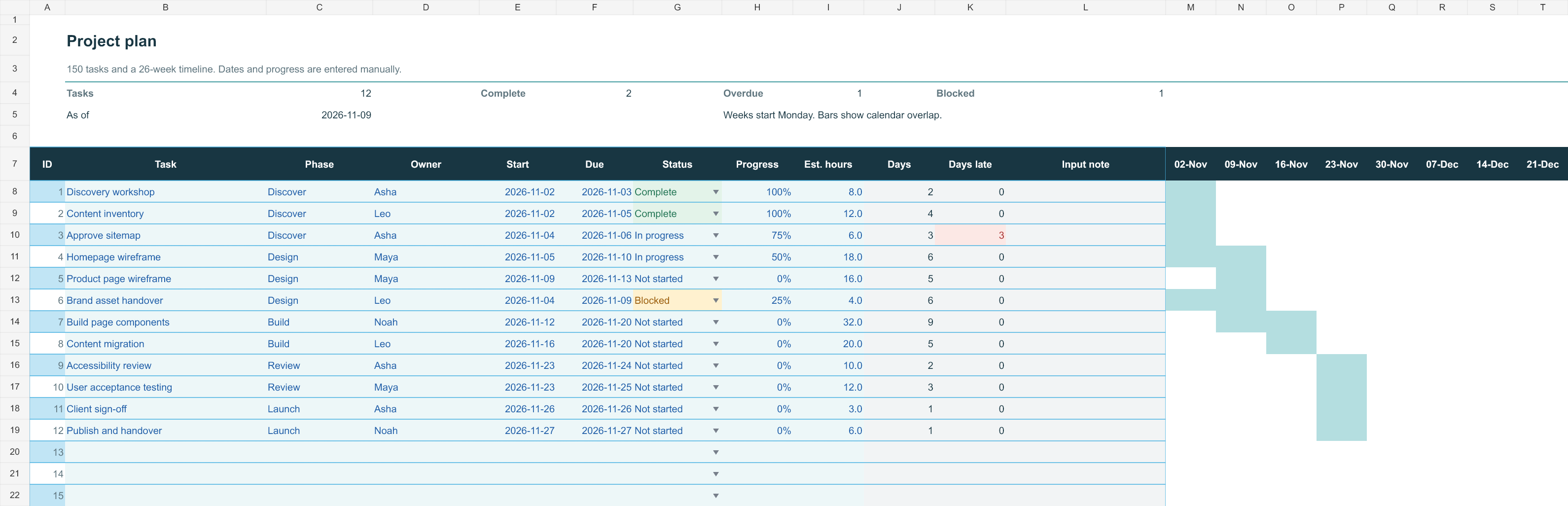
Map up to 150 tasks with owners, dates and progress. A 26-week Gantt view makes the schedule easier to scan.
You set the dates. The timeline follows.FOR SMALL TEAMS THAT WORK IN EXCEL
Bring tasks, team capacity, spending and open issues into one Excel workbook. Built for coordinators running small client projects. Try the free planner, or get the complete toolkit for $19 once.
Microsoft 365 Excel for Windows No macros No subscription
ONE TOOLKIT. THE USEFUL ESSENTIALS.
Built for the person keeping a small project moving. Start with the plan, then bring the rest into focus.
Map up to 150 tasks with owners, dates and progress. A 26-week Gantt view makes the schedule easier to scan.
You set the dates. The timeline follows.Allocate weekly hours across 10 people and 12 weeks. See where the plan exceeds someone's available time.
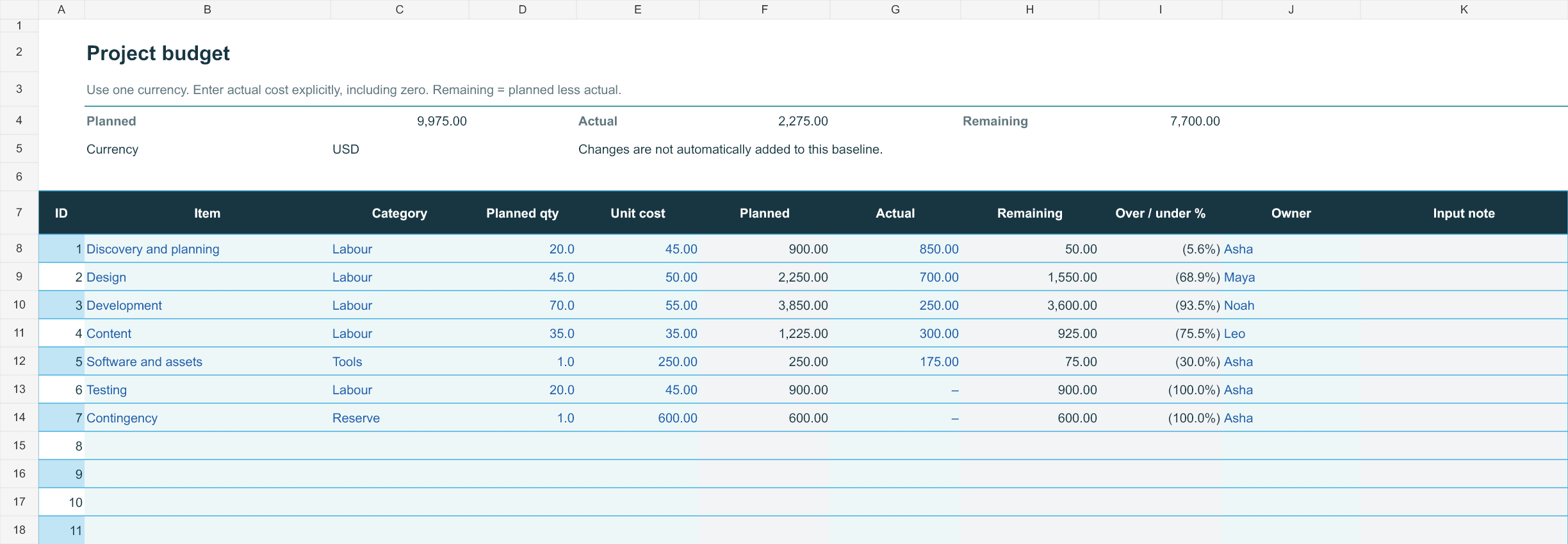
Compare planned and actual costs across 100 budget lines. Set your currency label and see the difference clearly.
Record risks, issues and decisions with clear owners, dates and next steps.
Track requests and their estimated time and cost impacts, with approved and pending items kept distinct.
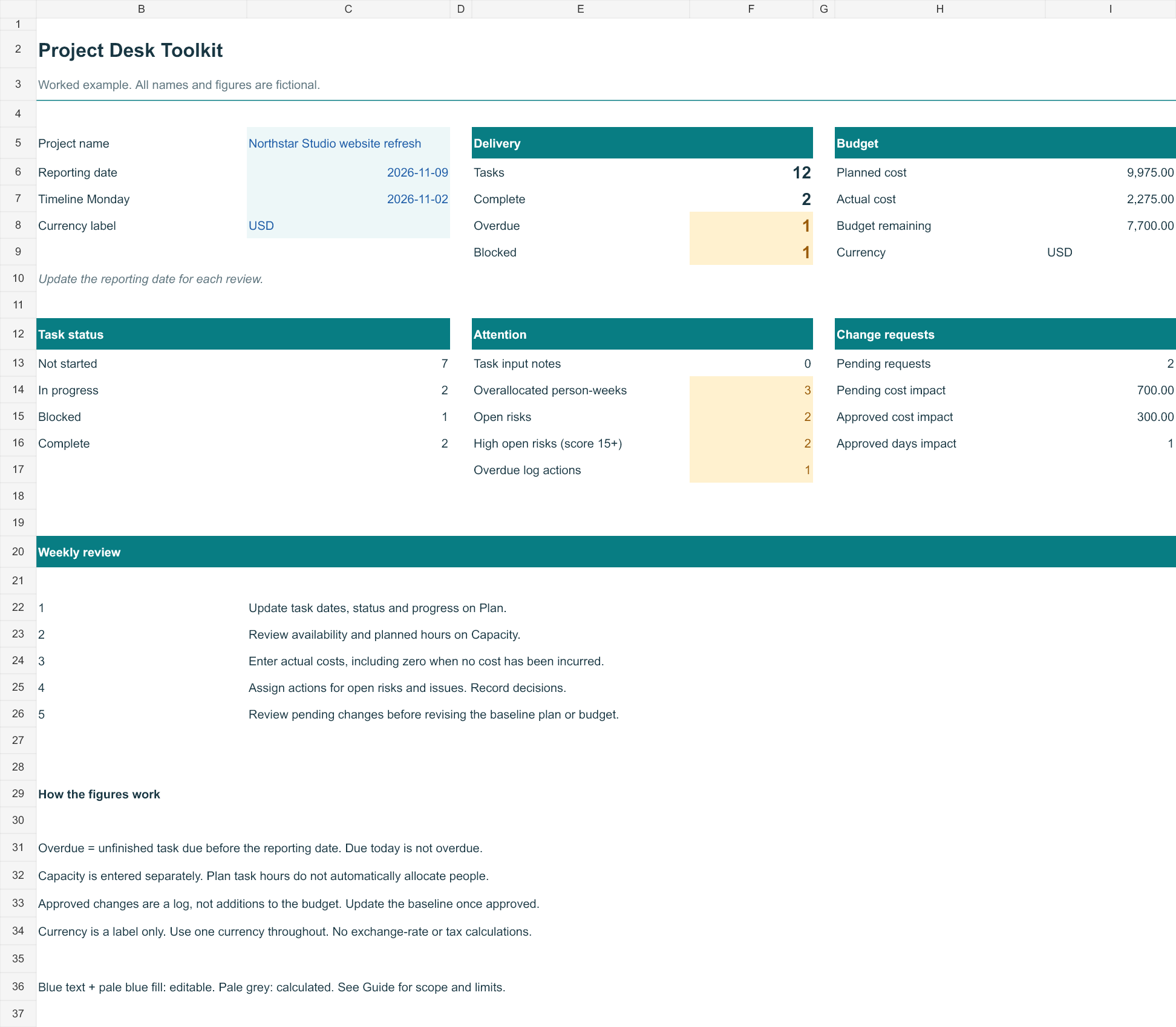
Bring the key project measures together in one concise overview, ready for your next check-in.
OPEN IT UP
A guided preview with fictional project data. Select a view to explore the workflow.
PROJECT / STUDIO WEBSITE
| Task | Owner | Progress | Week 1 | Week 2 | Week 3 | Week 4 |
|---|---|---|---|---|---|---|
| Discovery workshop | Maya | 100% | ||||
| Content outline | Alex | 75% | ||||
| Page designs | Maya | 40% | ||||
| Website build | Sam | 0% | ||||
| Accessibility review | Alex | 0% | ||||
| Launch checklist | Sam | 0% |
The workbook builds its weekly timeline from the start and end dates you enter. It does not automatically schedule dependencies.
CAPACITY / EXAMPLE WEEK
Enter available hours and allocated hours directly. Capacity does not infer effort from task dates.
BUDGET / EXAMPLE AMOUNTS
| Budget line | Planned | Actual | Remaining |
|---|---|---|---|
| Design | 2,500 | 2,400 | 100 |
| Development | 4,000 | 3,200 | 800 |
| Content | 1,000 | 650 | 350 |
| Tools & hosting | 500 | 200 | 300 |
| Total | 8,000 | 6,450 | 1,550 |
Remaining budget = planned cost − actual cost. These are project tracking figures, not accounting or tax calculations.
RISKS, ISSUES & DECISIONS
| Type | Record | Owner | Next action | Status |
|---|---|---|---|---|
| Risk | Content approval may be delayed | Alex | Confirm review date | Open |
| Issue | Two product images missing | Maya | Request original files | Open |
| Decision | Use the existing brand palette | Alex | Record in project brief | Closed |
Keep a short, owned next action beside each record. The full workbook has room for 50 records.
CHANGE REQUESTS
| Request | Status | Estimated cost | Estimated days |
|---|---|---|---|
| Add a case study page | Approved | 450 | 2 |
| Add a second language | Pending | 1,200 | 5 |
Change impacts are tracked separately. They do not automatically alter your budget or task dates.
FROM THE DOWNLOADABLE WORKBOOK
Actual workbook views.
Select an image to see it at full size.
 Overview ↗
 Project plan ↗
 Budget ↗
START WITH WHAT YOU NEED
| Your workflow | Free planner · $0 | Full toolkit · $19 once |
|---|---|---|
| Tasks and weekly Gantt | 50 tasks · 12 weeks | 150 tasks · 26 weeks |
| Weekly capacity | Not included | 10 people · 12 weeks |
| Planned versus actual spend | Not included | 100 budget lines |
| Risks, issues and changes | Not included | 50 log records + 50 requests |
| Weekly overview and worked example | One-sheet planner | Seven-tab workbook + fictional example + guide |
If you only need a task list and timeline, start free. Choose the full toolkit when you also need capacity, costs and open decisions in your weekly review. Both are downloadable Excel files, not a browser app.
A WEEKLY REVIEW, USING THE INCLUDED FICTIONAL EXAMPLE
Northstar Studio has 12 tasks, including one overdue task and one blocked task. The capacity view flags three overloaded person-weeks. Planned costs are 9,975, actual costs are 2,275, and 7,700 remains.
The point of the review: agree the next action for the blocked task, adjust the overloaded weeks, and check costs before approving more scope.
Hours are entered manually; changes do not automatically alter task dates or the budget.
A SMALL LEARNING CURVE
See how a fictional project moves through the toolkit, with a quick-start guide alongside it.
Use the blank workbook. Add your project, reporting date, task owners and schedule.
Update progress, review capacity and costs, and bring the overview to your next check-in.
A USEFUL ADDITION TO YOUR DESK
A straightforward purchase for a reusable set of tools. The same practical system, ready for your next project.
Read the quick-start guide$19USD · one-time purchase
Applicable taxes may be added at checkout.
Secure checkout and digital delivery through Gumroad.
Designed for Microsoft 365 Excel for Windows. No macros or external connections. Mac, Google Sheets and Excel mobile are not supported in this release.
A GOOD PLACE TO START
Try the free planner before choosing the full toolkit. A real Excel file, ready for your own tasks and dates.
Download the free planner.xlsx · No email required · Microsoft 365 Excel for Windows
FREE PROJECT RESOURCES
Excel planner and Gantt chart · Weekly capacity calculator · Printable review checklist · Status update builder · Browse all free tools
A FEW GOOD QUESTIONS
People coordinating a small project or team who prefer to work in Excel. It is suited to a single project workbook with up to 150 tasks, rather than a company-wide project management system.
Microsoft 365 Excel for Windows. The files do not use macros or external data connections. This release is not designed for Google Sheets, Apple Numbers or mobile spreadsheet apps.
Workbook formulas, example totals, file structure and a no-charge purchase/download have been checked. Native desktop Excel opening, editing and print behavior have not yet been verified. Try the free planner in your Excel setup before buying; the paid toolkit has a 14-day refund policy.
You enter task dates, progress and weekly hours. The workbook calculates summaries and draws the timeline. It does not schedule dependencies, assign people or infer hours from task dates.
The full toolkit license permits internal use by you and one organization. You may share it with your colleagues for that organization's work. Reselling, redistributing or publishing the editable files is not permitted. Simultaneous editing depends on your own Microsoft 365 setup.
No. The full-toolkit purchase is a one-time payment for version 1.0. You keep the files. Your Microsoft Excel license is separate.
Your entries stay in your workbook, wherever you choose to save it. This website does not receive your spreadsheet contents. If you use OneDrive or another storage service, that service's settings apply.
You can change the editable inputs and use your own project details. Keep an untouched backup before changing formulas or layout. Custom setup or bespoke spreadsheet development is not included.
Start with the quick-start guide and the Guide sheet inside the workbook. For purchase or file support, reply to your Gumroad receipt or email ravishmehta84@gmail.com. Include your order reference and remove confidential information from screenshots.
The Gumroad product listing provides a 14-day refund policy. Review that policy at checkout, or email ravishmehta84@gmail.com with your order reference about a refund. Your statutory rights are unaffected.